Organize Sua Vida, an Android hub for personal work planning
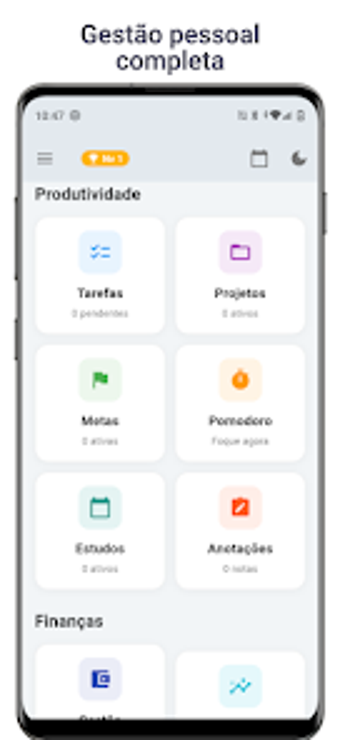
Organize Sua Vida from SEVEN SOFTWARE CONSULTORIA LTDA is an Android app designed to balance professional and personal routines. It merges task management, habit tracking, and personal finance into a single mobile workspace that supports Kanban boards, a configurable Pomodoro timer, a password-protected diary, and interactive dashboards. The app targets students, solo professionals, and individuals who want an all-in-one, phone-based planner with local data storage for privacy and offline access.
How the app arranges daily workflows across life areas
The app groups tasks, schedules, finances, and habits into one workspace so users can manage different outputs from a single place. It presents multiple workflow modes, including Kanban boards for visual task flow and a configurable Pomodoro timer for focused sessions. For quick lists and reminders the tool offers a smart shopping list and birthday reminders, and interactive reports show activity and financial trends.
What onboarding and day-to-day use look like for non-specialists
The interface is presented as clear and simple, lowering the barrier for users without specialist training. Templates and a weekly study schedule help structure recurring work, while the personal diary offers password protection for private notes. Gamified achievements provide motivation without added setup, so users can adopt core workflows by following in-app prompts rather than formal training.
How it handles compatibility, collaboration, and reliability
The app stores data locally and operates 100% offline, which removes dependence on external servers but limits real-time sharing and cloud sync. File export or cross-device syncing is not described, so teams that require shared access may find collaboration constrained. Reports and finance graphs run on-device, and the developer states the app is lightweight and performs on older hardware, supporting daily record keeping without heavy resource demands.
A practical solo planning solution with clear trade-offs for teams
The app suits individuals and students who need a single-device planner that keeps control and records on the phone. Expect a focused, local-first experience rather than team collaboration or enterprise reporting. For anyone managing personal routines, study timetables, and simple financial logs on one device, it is a pragmatic choice; organizations or multi-user workflows should consider tools offering cloud-based sharing.